
How to hide the quick add-to-cart button on the bundle products collection?
How to hide the Quick Add to Cart button on a bundle collection
Some Shopify themes include a built-in Quick Add to Cart button on collection pages. Because a BYOB bundle does not have a fixed variant until the customer makes their selections, using Quick Add on a bundle can attempt to add an incomplete bundle to the cart and trigger an error.
You can prevent this by disabling Quick Add for the collection template used by your bundle collection.
How to disable Quick Add for your bundle collection
- From your Shopify admin, go to Online Store → Themes, then click Edit theme on your current theme.
- In the theme editor, switch to a Collection template using the page picker at the top of the screen.
- Check the settings on the left to see if your theme provides an option to disable Quick Add to Cart.
- If your theme supports this option, don't disable it on the current template yet. Doing so would remove Quick Add from all collections using that template.
- Instead, click the template name at the top of the settings panel and select Create template. This creates a separate collection template that you can apply only to your bundle collection.
- Give the new template a recognizable name, such as Bundles collection.
- With the new template selected, disable the Quick Add to Cart option.
- Go to Products → Collections in your Shopify admin and open the collection containing your bundles.
- Under Theme template, select the new template you created.
- Click Save.
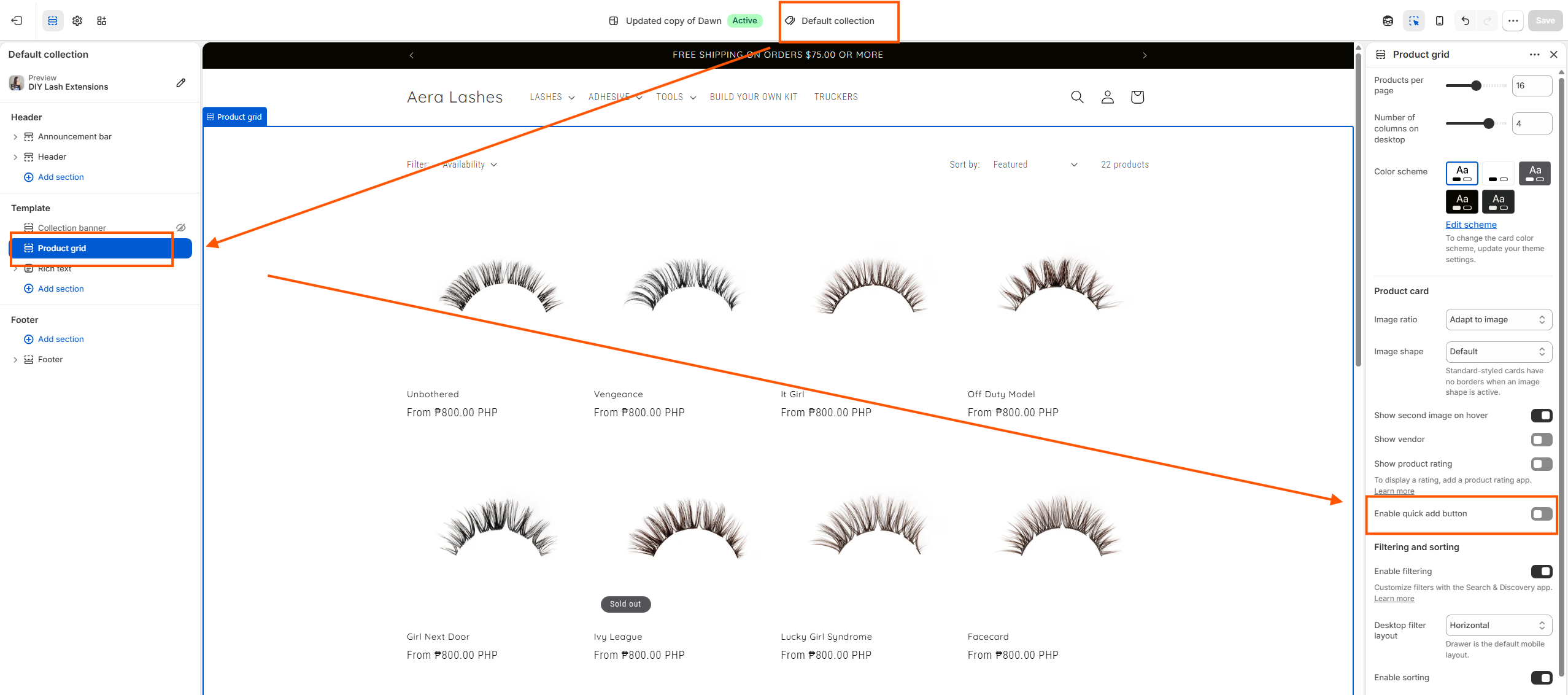
The Quick Add to Cart button will now be hidden from the bundle collection without affecting other collections in your store.
If your theme doesn't support disabling Quick Add
If your theme doesn't provide an option to turn off Quick Add, hiding the button will require a custom theme-code modification. Please contact us for assistance